
← jui vizCost and migration plansEstimate what your declared infrastructure costs a month, read it hour by hour in the server room's cost view, and price a migration plan step by step before you make it.12 min read
The files the simulator needsThe cost comes from two kinds of files beside the model: a load file per environment and month, and, only where you need them, your own prices.
Load and pricesMonthly load goes in docs/infra/load/*.json (jui.config.json's infra.load_dir moves it) and prices in docs/infra/prices/*.json (infra.prices_dir).
A load file is one month of one environment: its timezone, profiles of hourly multipliers, the week, special days and holidays, schedules, and per node its quantities (from a fixed list such as requests, vcpu or storage_gb) with optional autoscale or vertical scaling.
shell
jsonui-doc validate infra-loadjsonui-doc validate infra-pricesChecking them`jsonui-doc validate infra-load` and `jsonui-doc validate infra-prices` check the shape and the secret shapes. builtin:infra-load in checks reports a node billed by use that has no load (undefined, not 0) and a row naming a node the model does not have. With no load file at all it passes with a warning that nothing was compared.
Pricing rules per provider; sku and vertical.perThe pricing rules are registered per provider (aws/<service> and cloudflare/workers, r2, d1 and queues, ahead of the generic rule for the category), so builtin:infra-load knows which nodes are billed by use: a Cloudflare D1 database with no load row is reported.
A load row can also say sku (the type a fixed row runs, priced by it), and vertical.per (what the steps' amounts are per; default hour).
More quantitiesA load row's quantities also include metrics (custom metrics kept, such as Container Insights') and rules (a web ACL's).
A SaaS billed by use reads requests and an LLM's input_tokens and output_tokens (by_sku for a node that calls several models, each priced as <model>:input-tokens and <model>:output-tokens), and a CI service reads build_minutes and storage_gb. Such a node with no load is load undefined, not no rule. Measured: the example's stripe node is load undefined.
Problems in one lineEach problem `jsonui-doc validate infra-load`, `validate infra-prices` and `cost infra` print says in one line what is wrong, by the schema's keyword (the type found, the limit, what is allowed): in Japanese on the CLI whatever LANG is, and in the page's language in the server room. --json keeps its English message and adds short (the line as printed) and detail (the keyword and what was found).
Measured under LANG=en_US.UTF-8 on a load file with a null timezone: /timezone は文字列です(今はnull) on the CLI, and "message": "must be a string (it is a null)" in the --json.
How the cost is calculatedThe calculation is shown in the server room (see The cost view below).
Meters, priced on the month's running totalsEach node's rule turns every hour of the month into meters (requests, GB-seconds, hours and so on), and the meters are priced on the month's running totals. So a free amount and price tiers belong to the price row and are shared by every node it prices, the first nodes in the model's order taking the free amount first. Amounts are in USD only.
Autoscale and vertical delays count in whole hours: under 30 minutes is none, 30 minutes or more is a whole hour (30 is 1 hour, 89 is 1, 90 is 2).
Where a price comes fromPrices come from your price files first, then from the fetched cache, then from a bundled table: AWS ap-northeast-1 and us-east-1, and Cloudflare, on-demand. The table also holds Azure japaneast and eastus (204 rows) and Google Cloud asia-northeast1 and us-east1 (62 rows), 713 rows in all.
The bundle is built upstream; reading Google Cloud's catalog needs a key there, and jsonui-cli asks nothing of your accounts.
shell
jui viz cloud-prices fetchThe daily price fetchA running jui viz server fills the cache once a day from AWS's offer files and the Azure Retail Prices API (see Safety, and `jui viz cloud-prices` in /reference/cli-commands). The daily fetch reads 73 files by default. The files that failed in it are fetched again an hour later, those files alone. The retry does not move the time of the daily fetch.
A fetched file is read only by the jsonui-cli version that wrote it. Right after an upgrade the bundled prices stand in, with a note saying how many files were set aside, until the prices are fetched again. An upgrade makes that fetch due at once, so a running jui viz server fetches 10 minutes after it starts (not right after it starts). When you need the prices sooner, or use jsonui-doc alone, run `jui viz cloud-prices fetch`.
Measured with a planted cache file pricing CloudFront at ten times the bundled rows: read when its index named the running version ($5,117.89 for the example's month), set aside when it named another version ($1,018.60, the bundled prices).
Free amounts, scenarios and the accountA scenario is one environment, and the free amounts are taken once per scenario, so production and staging in one account each take the account's free amount. When the model has two or more environments and a row with a free amount was used, the result carries a cost.free_per_scenario warning that names the rows.
A free amount can also belong to a pool shared across regions and services: aws:data-transfer-out, AWS's 100 GB a month out to the internet, which the bundled egress rows carry. In your price files free.pool takes only that name, any other is an error. The engine can also price a set of scenarios as one account, taking the free amounts once (simulate_account); the cost view uses it by default.
What the bundled table coversThe bundled table also covers what the rules charge for: RDS db.t3 (MySQL and PostgreSQL, single and multi-AZ), EFS, EBS gp3, Route 53, SES, public IPv4, NAT gateways, CloudWatch alarms and custom metrics (10 free of each), WAF's requests, web ACL and rules, EventBridge Scheduler, more EC2 types, and Fargate and Lambda on ARM: a node whose spec says arm64 is priced on the ARM rows.
It also has rows for DynamoDB provisioned capacity, ElastiCache Serverless, Aurora, DocumentDB, MSK, OpenSearch, MariaDB, KMS, Parameter Store, Cognito's tiers, Kinesis PUT units, Step Functions, App Runner, Lightsail, Gateway and Classic Load Balancers, EventBridge custom events, Cloudflare KV, Zero Trust and Load Balancing, Firebase Realtime Database and ECR. A rule that prices on an assumption says so, for example App Runner's active hours counted whole.
The cost view, step by stepThe server room shows the simulator beside the 3D. jui viz computes nothing itself: it runs jsonui-doc's load reader, price book and engine on the room's files, and keeps the last two months it worked out. The demo page computes no cost.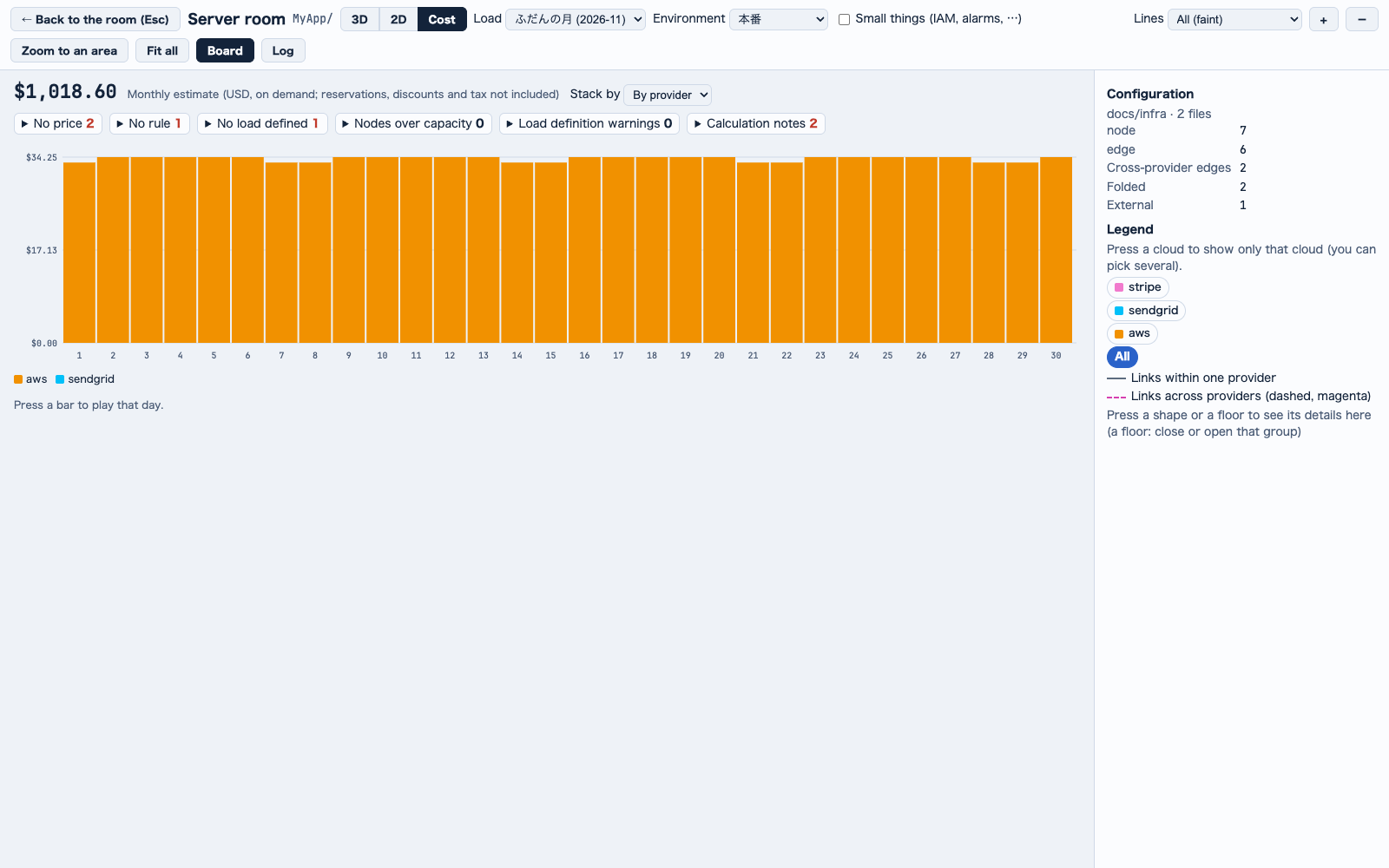 The month: total, what is not priced, and a column per day. Press a column to play that day.
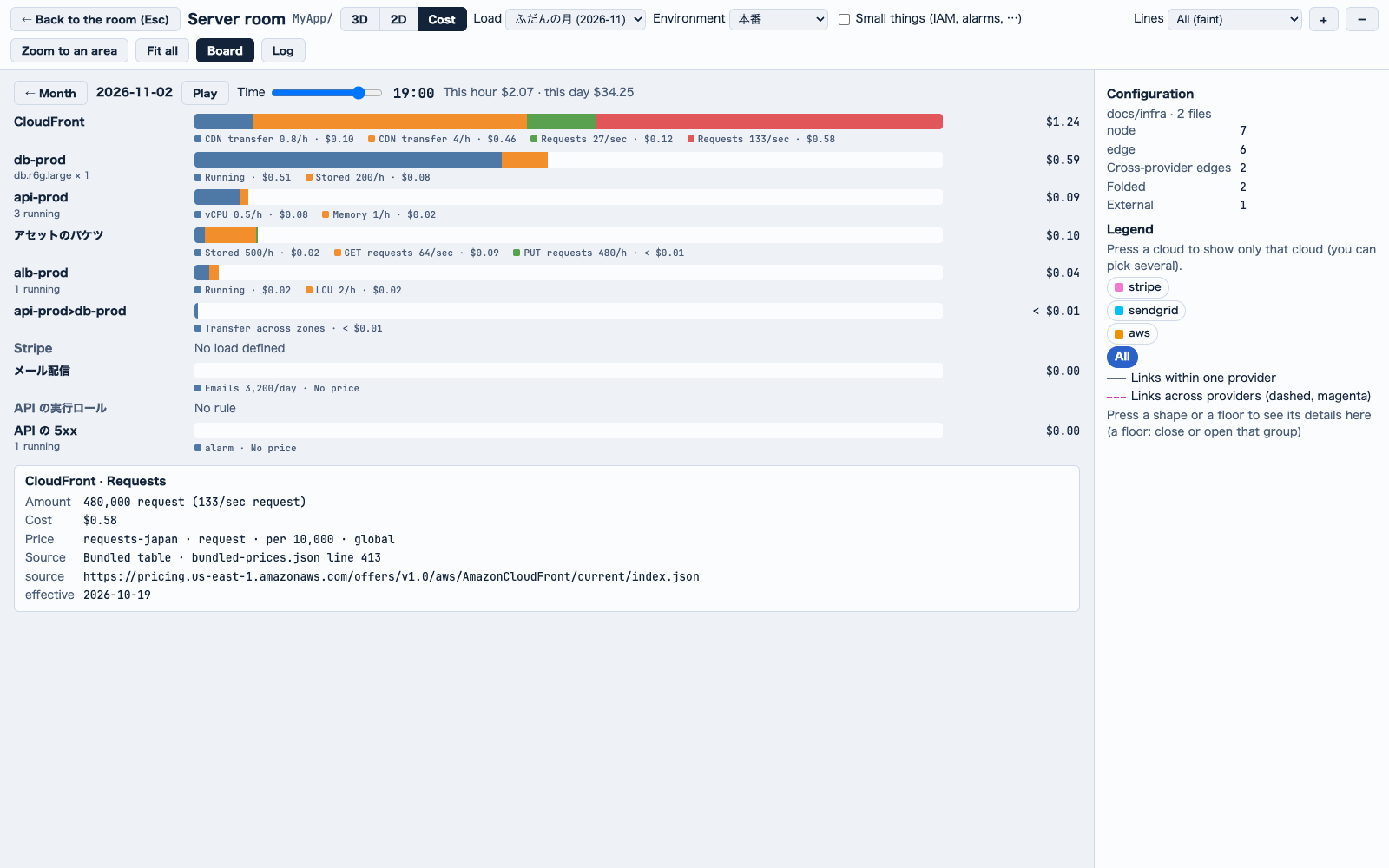 A day, hour by hour: each bar's meters, and where one price came from.
1
In the server room, press Cost (コスト) on the header (in the 3D / 2D / Cost group). The 3D stops drawing while the cost is shown, and Zoom to an area is not available there. 3D or 2D goes back to the room.2
Pick a scenario in Load (負荷), the list that appears on the header: one load file at a time, shown as its label and month.3
Read the month's total at the top: a monthly estimate in USD, on demand, with reservations, discounts and tax not included. With two or more environments, choose The account's total (アカウントの合計) or This environment only (この環境だけ).4
Read the stacked daily columns, stacked by provider or by the month's top nodes (Stack by (積み上げ)). A red mark sits on a day with an hour over capacity, a ⚑ on a day at the autoscale's top.5
Open the chips under the total: what is not priced (No price (単価なし), No rule (規則なし), No load defined (負荷未定義)) is always counted there, beside the engine's warnings.6
Press a day's column to play it hour by hour: a Time (時刻) slider, Play and Stop. It does not play under reduced motion; the slider still works.7
Read each top node's bar, split into its meters with the rate as written and the charge. Demand over capacity is red as served / came (捌けた / 来た).8
Press a segment to see where its price came from: layer, file, row, source and effective date. ← Month (← 1 か月) goes back.The month: total, what is not priced, and a column per day. Press a column to play that day.A day, hour by hour: each bar's meters, and where one price came from.The account's totalWhen the model has two or more environments and each has a load file for the month, the view opens on The account's total (アカウントの合計): every environment priced on one running total, stacked by environment, with free amounts and steps taken once (the environment listed first takes them first). This environment only (この環境だけ) goes back to the chosen scenario's own month. An environment with no load file for that month is left out and named. With one environment there is no switch.
When the model has two or more environments and a row with a free amount was used, a note under the total says the free amounts were taken per scenario.
Measured with a staging load file added to the example: $1,536.13 for the account (production's $1,018.60 and staging's $517.53), $1,018.60 for This environment only. `jsonui-doc cost infra` still prices one scenario.
A day's rowsA day's row is its bar over its words. The bar takes the row's whole width: the hour's dearest row reaches its end and the others go by their ratio, easing as the hour moves. Each meter's words go under it, cut at two lines with ▼ Show the whole breakdown (▼ 内訳を全部見る); ▼ Show every row's breakdown (▼ すべての行の内訳を見る) in the day's header opens them all.
How amounts are written; on a phoneEvery amount the page shows (the cost view, the bills, a migration plan) follows one rule: to the cent, under a cent < $0.01, a fall with its sign. On a phone the server room is the page's width and the board goes under it.
shell
jsonui-doc cost infrajsonui-doc cost infra --scenario salejsonui-doc cost infra --date 2026-11-02The same numbers without jui vizThe same month, or one day with --date, comes out of `jsonui-doc cost infra` without jui viz (--json for the whole reply). It exits 0 when it simulated, 1 when it simulated but a load file had an error (that file is left out), and 2 when nothing could be simulated (no model, no load file, no such scenario, a date outside the month), each measured.
Measured on upstream's aws-three-tier example: a month of $1,018.60 in the cost view and on the CLI, and $2,679.35 for the sale scenario. The CLI lists two meters with no price, one node with no rule and one with load undefined (the stripe node, see More quantities).
Migration plansYou can write a change to the infrastructure as a plan, check it, price it step by step, and play it in the server room.A fictional plan for upstream's aws-three-tier example: add a serverless cache beside the API, with its load row, and remove the assets bucket. These files pass `jsonui-doc validate infra` and give the measured numbers below.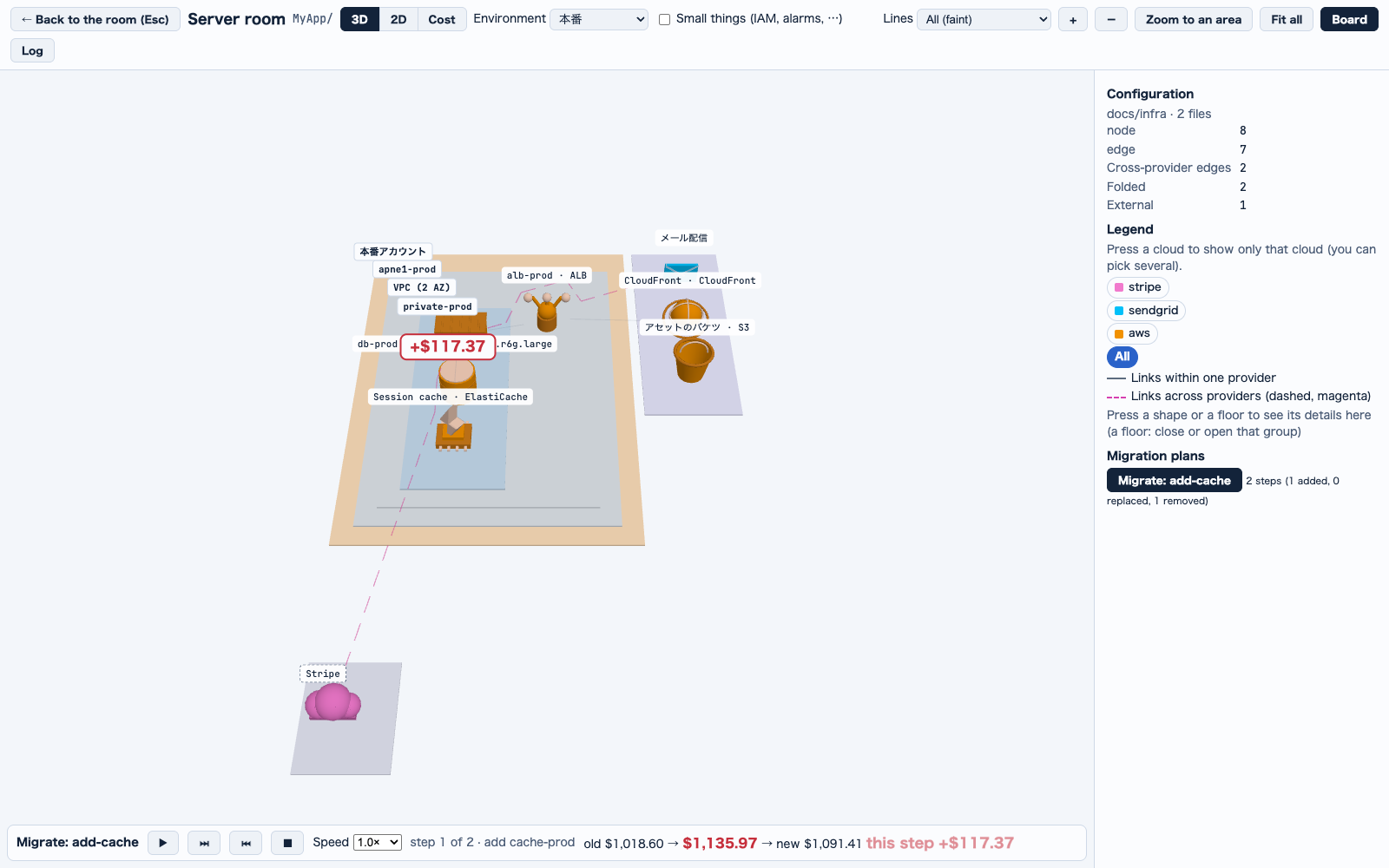 A plan played one step at a time, with what each step costs.
A plan is a folderA plan is a folder under docs/infra/migrations (jui.config.json's infra.migrations_dir moves it; it is not read as part of the model) holding two files; either can be left out:
• changes.json: an infra-model v0 file of the nodes, groups, edges and flows to add or to put in place of those with the same id, with an optional order of node ids
• removals.json: the ids of what goes (an edge by its id or by its two ends)
docs/infra/migrations/add-cache/changes.json
{ "version": 0, "description": "Add a serverless cache; drop the assets bucket", "nodes": [ {"id": "cache-prod", "category": "cache", "service": "elasticache", "group": "private-prod", "label": "Session cache", "environments": ["production"]} ], "edges": [ {"from": "api-prod", "to": "cache-prod", "protocol": "redis", "environments": ["production"]} ]}docs/infra/migrations/add-cache/removals.json
{ "version": 0, "nodes": ["assets"]}a row added to loads in docs/infra/load/ordinary.json
{"node": "cache-prod", "quantities": {"ecpu": {"amount": 1000, "per": "second"}, "storage_gb": 1}}How the new model is madeThe old model + changes − removals is the new model: an id the old model has is replaced, a new one is added, a named one is removed, an edge goes with an end that goes, and a replaced node keeps its edges unless the plan names them.
The steps are one node each (order, then the rest of changes, then removals), plus one step when edges, groups or flows change with no node of their own.
shell
jsonui-doc validate infra --migration add-cachejsonui-doc cost infra --migration add-cacheCheck and price a plan`jsonui-doc validate infra` checks every plan (--migration <plan> checks one). A plan with an error, such as removing what the old model does not have, is not used and makes the exit 1.
`jsonui-doc cost infra --migration <plan>` prices the old model, the model after each step and the new one with the same load files and prices, and prints old, new and the difference, each step's total with its own difference, and the difference by node and by provider; --account adds the account's month. A load row for a node the plan adds counts from that node's step and is no warning meanwhile. It exits 2 for no such plan, a plan with an error, or --account without two environments that each have a load file.
MeasuredOn upstream's aws-three-tier example with a plan that adds an ElastiCache Serverless node (with its load row) and removes the S3 bucket: old $1,018.60 -> new $1,091.41 a month (+$72.81), step 1 +$117.37, step 2 -$44.56.
The prices follow the load files, not a node's spec: a plan replacing db-prod with instance_class db.r6g.xlarge moved nothing ($1,018.60 -> $1,018.60), since the load row's sku, which the price follows, still says db.r6g.large.
1
In the server room, find Migration plans (移管計画) on the board. Each plan shows its steps and how many nodes it adds, replaces and removes; one with an error says why and cannot be played.2
Press Migrate (移管) on the plan (the button reads Migrate: <plan name>). The old and the new are laid out together and the old one is shown.3
Use the player: play, pause, One step forward (1 ステップ進む), Back to the start (最初に戻す), Close (back to the current model) (閉じる(今の構成に戻す)) and the speed.4
Watch each step: an added node grows and its edge is drawn from its start, a replaced one shrinks while its new version grows, and a removed one's edges shrink to their middles before it goes.5
Read the money: the player shows old → now → new (旧 → 今 → 新) and the step's difference, and a tag with its own difference floats over each node that moved in the step. Switch to Cost (コスト) for a table of old, new and difference by node and by cloud.A plan played one step at a time, with what each step costs.Without load files; MCP; the demoWith no load files the player says No cost (needs load definitions) (コストは出せません(負荷の定義が要ります)). The MCP server does the same through infra_validate's plan and infra_cost's plan and account. The demo's room has no plan.
Not there yet
What the server room has, and does notThe server room has the diagram (in 3D, and flat in 2D), each node's spec, the closer look, the box zoom, flows played (with their route in a side bar), the cost view (the account's total by default) and migration plans played a step at a time. Agents, skills and MCP are not in it.
Keep reading
jui viz`jui viz` shows the Claude Code sessions and subagents running on your machine, and the Codex sessions too, as rooms and robots in the browser. Start with the demo below, then pick the article for what you want to do./viz
Infra modelThe files that describe your infrastructure, which the server room reads./viz/infra-model