
← jui vizSkill spirits and your own 3D modelsWhile a session uses a skill, a spirit stands behind its robot. This article shows what you see, the two bundled models, and how to add your own .glb model for a skill and check it.10 min read
What a spirit isWhile a session uses a skill, a ghostly spirit rises behind its robot and goes when the skill ends. A spirit is a model: a folder with a spirit.json and .glb files. Besides the figure behind the robot, a model can put parts on the robot (a hat, glasses, a scroll in its hand), change its eyes and pose, and add effects such as sparks or a bubble of words.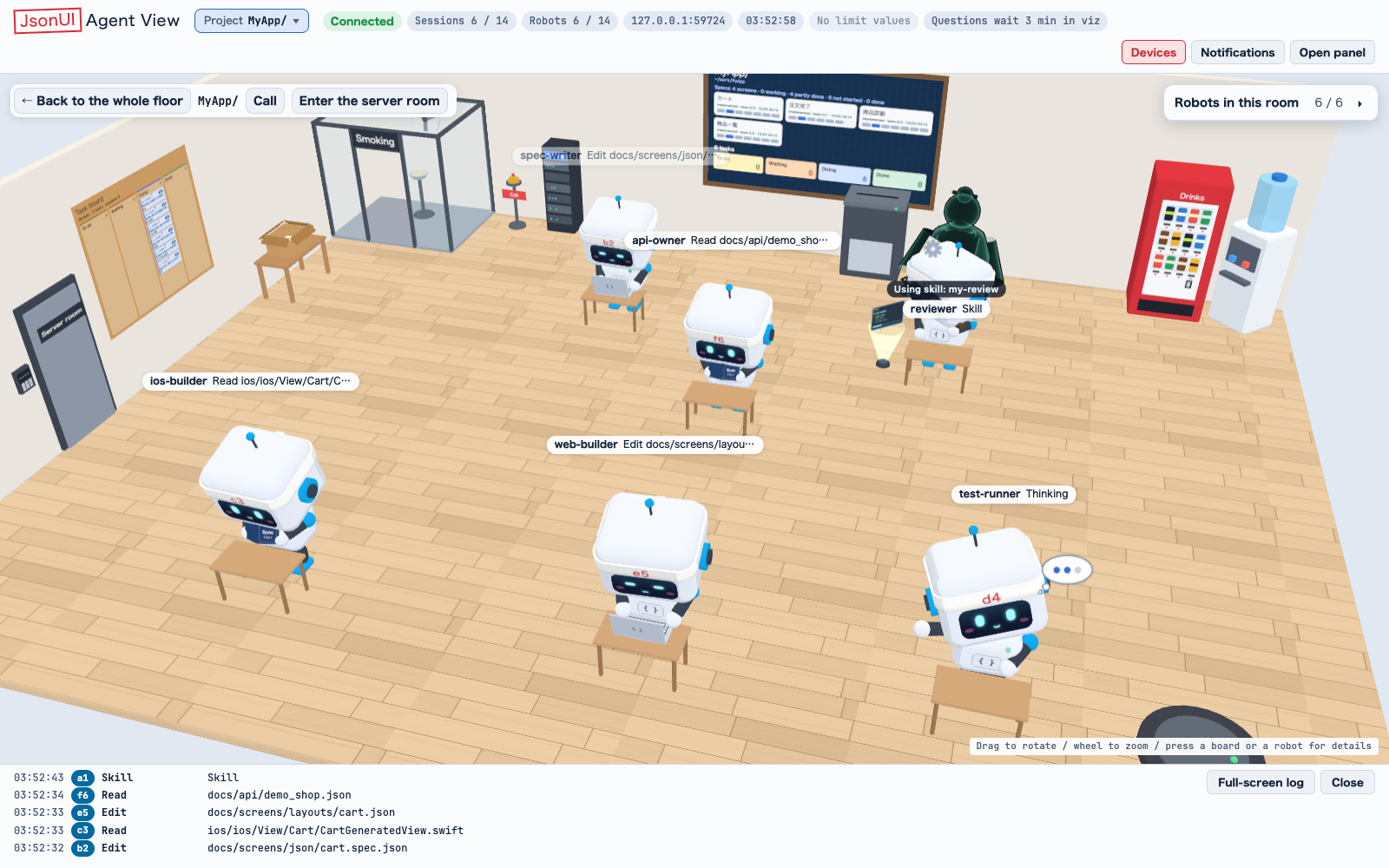 The bundled Ink Scholar while a session uses a skill.
When it comes and goesA spirit rises when the session calls the Skill tool, and a model is chosen at random at each skill's start. The badge Using skill: <name> (スキル使用中: <名>) shows by the name tag with or without a model.
It goes when the skill ends: an inline skill with the turn's end, the next prompt or the next skill; a forked one with its own result; one that never ends after 30 minutes. A forked skill runs in a subagent, so its spirit stands behind that subagent's robot. What the robot wore and hid is put back when the skill ends.
Where it does not show• Four spirits stand at most. A robot past them still wears its parts.
• Only the two nearest the camera draw their outline and glow (and afterimages).
• Under reduced motion a spirit stands still; the aura and glow stand still too, and there are no sparks, lightning, afterimages or shouts.
• In the building view, or when a robot is drawn smaller than 48 px on screen (a floor seen from far), there is no spirit and no effects, only the parts.
• A robot hidden in Robots in this room (この部屋のロボット) hides its spirit with it.
• Spirits show on the live page only, not in the demo.
The two bundled modelsTwo original models come with jui viz. Neither names a skill, so either can appear for any skill that none of your models names. Each has weight 1.
Gear Giant (歯車の巨人)A golden giant of gears behind the robot. The robot wears goggles, its headband is hidden, its eyes are sharp and amber, and it types. Three afterimages trail the giant, sparks rise, and Clank and Bong pop up every half second (カチ and ゴン in Japanese).
Ink Scholar (墨の書生)A pale teal scholar behind the robot. The robot wears glasses and holds a scroll in its left hand, its eyes are narrow and teal, and it takes the book pose (left hand up, right hand typing). Dark ink specks rise, and a bubble from the spirit says Taking up the brush with the ruby review, in a Mincho font, for 4 seconds (筆を執る with レビュー in Japanese).
How the bundled ones are madeThey are built as three.js code and written to .glb by a tool in the jsonui-cli repository, jui_tools/tools/spirits (it needs Playwright and its Chromium). Each written .glb is read back with the page's loader and checked as viz reads it. Only original works go in that repository; a model made after someone else's work belongs in your own spirits folder.
Add your own modelThe example below adds a model called paper-crane that appears only while a session uses a skill named my-review. Both names are made up; use your own.A model reads only spirit.json, spirit.glb, robot-*.glb and prop-*.glb. Any other file, and any symbolic link, is noted and not read. A model needs something to show: at least one .glb, or effects in spirit.json.A minimal spirit.json`version` is required and must be 1. If you write a `spirit` object it needs a `file`; leave `spirit` out and the figure is still spirit.glb, standing at the robot's back.
1
Make a folder for the model in ~/.local/state/jui-viz/spirits/. To keep models elsewhere, set `spiritsDir` in the viz folder's config.json (an absolute path, or one from the viz folder).2
Name the folder with letters, digits, _ and - only (64 characters at most), such as paper-crane. A folder starting with a dot is ignored, and any other name is skipped and listed by `jui viz doctor`.3
Put the .glb files in it: spirit.glb for the figure behind the robot, robot-<name>.glb for parts the robot wears, prop-<name>.glb for things it holds.4
Write spirit.json next to them, naming your skill in `skills`.5
Run `jui viz doctor` and look at the spirits row: your model should count as ok.6
Use the skill in a session. The page asks for the list of models at most once a minute, so a new model shows from the next skill after that.folder
~/.local/state/jui-viz/spirits/ paper-crane/ spirit.json the settings (required) spirit.glb the figure that stands behind the robot robot-hat.glb a part the robot wears prop-crane.glb a thing the robot holdsspirit.json
{ "version": 1, "name": {"en": "Paper Crane", "ja": "折り鶴"}, "skills": ["my-review"], "spirit": {"file": "spirit.glb"}}How a model is matched to a skillAt each skill's start, the page picks among the models whose `skills` list names that skill. If none names it, it picks among the models that name no skill, which includes the two bundled ones.
The pick is random, weighted by `weight` (0 to 10, 1 when left out). A model with weight 0 is never chosen. So paper-crane above is the only candidate for my-review, and it never appears for any other skill.
`skills` holds 1 to 50 names, each of letters, digits and _ . : - (128 characters at most).
More than one folder of modelsUp to 50 of your models are read, the first 50 by folder name. A model of yours may share a bundled one's name: both are kept.
What spirit.json can sayEvery key, type and range is checked against closed lists. An unknown key, anchor, pose, effect or colour is an error, so a typo is reported rather than quietly ignored, and a model with any error is never chosen.
spirit.json
{ "version": 1, "name": {"en": "Paper Crane", "ja": "折り鶴"}, "skills": ["my-review"], "weight": 2, "spirit": { "file": "spirit.glb", "at": "back", "scale": 0.8, "opacity": 0.6, "tint": "#c8e0ff", "clips": {"appear": "appear", "loop": "loop", "leave": "leave"}, "material": {"kind": "ghost", "rim": "#ffffff", "shade": "#203040"}, "outline": {"color": "#102030", "width": 0.02} }, "parts": [ {"file": "robot-hat.glb", "at": "head"}, {"file": "prop-crane.glb", "at": "handL"} ], "robot": {"hide": ["antenna"], "eyes": {"shape": "narrow", "color": "#c8e0ff"}, "pose": "type", "tag": "auto"}, "effects": { "glow": {"color": "#c8e0ff", "opacity": 0.3, "scale": 1.05}, "sparks": {"color": "#ffffff", "rate": 4, "rise": 0.6} }, "bubble": {"text": {"en": "Folding the review", "ja": "レビューを折ります"}, "target": "spirit", "showSec": 4}, "shouts": {"texts": {"en": ["Fold", "Crease"], "ja": ["パタ", "スッ"]}, "everySec": 0.8, "style": {"fill": "#ffffff", "stroke": "#203040", "skew": -8}}}Values used everywhere• Colours are #rrggbb.
• A position (offset) is three numbers from -10 to 10, in the robot's units. A rotation (rotate) is three numbers in degrees from -360 to 360, so a quarter turn is 90.
• Text is a string, or a table by language such as {"en": "...", "ja": "..."}, 200 characters at most. The page uses its own language, then ja, then the first one written.
• Anchors (where something goes on the robot): head, forehead, band, headset, face, handL, handR, back, root.
Top level• version: 1 (required).
• name: the model's name, as text.
• skills: the skills it appears for (see How a model is matched to a skill).
• weight: 0 to 10, 1 when left out.
• spirit, parts, robot, effects, bubble, shouts: the groups below.
spirit: the figure behind the robot• file (required here): a .glb in the folder.
• at: an anchor, back when left out. scale: 0.1 to 5. opacity: 0 to 1 (0.55 when left out). tint: a colour.
• clips: {appear, loop, leave}, the names of animation clips in that file. Left out, clips named appear, loop and leave are played if the file has them. loop repeats; appear and leave play once. A clip named here that the file lacks is an error.
• material: kind ghost or plain. ghost is the page's see-through look, a rim of light over a shade fading downward: rim, shade and base colours, rimK 0 to 4, pow 0.5 to 8, yFade -4 to 4, yFadeLen 0.05 to 8. plain, or no material, keeps the model's own colours, transparent and tinted.
• outline: color and width (0 to 0.2).
• offset and rotate: move and turn the figure from its anchor, as they do a part. The scale is applied once.
parts: what the robot wears and holdsA list of up to 16 parts. Each has:
• file (required): a robot-*.glb or prop-*.glb in the folder.
• at: an anchor. offset and rotate: three numbers. scale: 0.1 to 5.
Left without at, a robot-*.glb goes on the head and a prop-*.glb in the right hand. A robot-*.glb or prop-*.glb in the folder that parts does not list is still put on, at that default place.
robot: the robot's own look• hide: any of band, antenna, headset, taken away while the skill runs and put back after.
• eyes: shape normal, sharp or narrow, and a color.
• pose, at the desk only: type (the usual typing), book (the left hand holds a book up, the right types), arms-crossed (no typing) or none (as the state poses it).
• tag: auto, top or cheek. auto moves the name tag to the robot's cheek when something is worn on its head.
effects: drawn by the page• aura: color, style flame (the default: an envelope with rising tongues) or column (an open cylinder), size 0.3 to 3, height 0.2 to 4, opacity 0 to 1, flicker 0 to 4 (0 is still).
• sparks: color, rate 0 to 40 a second, rise 0.1 to 4, size 0.05 to 0.3. Each spark lives 1.6 seconds, so rate 40 is 64 at once.
• lightning: color, everySec 0.3 to 30, count 1 to 4 bolts at a time, length 0.5 to 4.
• afterimage: count 1 to 4, spreadDeg 0 to 60. Needs a figure with clips.
• glow: color, opacity 0 to 1, scale 1 to 1.5 (1.03 is a rim of 3% of half the figure's longest side). Needs a figure.
bubble: words in a speech bubble• text (required): text, or a list of 1 to 6 lines.
• ruby: a reading shown over the first line.
• showSec: 0.5 to 30 seconds (4 when left out), counted from when the bubble is first drawn.
• target: spirit or robot, whose head the tail points at. For the spirit, a node named bubbleAnchor in spirit.glb is used, else the top of the figure.
• font: gothic or mincho. tail: left or right.
shouts: words that pop up• texts (required): 1 to 20 words, or a table of such lists by language.
• everySec: 0.1 to 10 (0.6 when left out).
• style: fill and stroke colours, skew -45 to 45.
Limits for the .glb filesA model is checked without being unpacked, and only the models found ok are given to the page. Any one problem makes the whole model broken: it is never chosen.
Sizes• One file: 20 MB at most.
• The whole folder: 50 MB at most.
• spirit.json: 64 KB at most.
• Triangles: 100,000 at most, in one file and in the model as a whole.
• Textures: a side of 2048 px at most.
Format• A binary glTF 2.0 file (.glb).
• Everything inside the .glb: a buffer or image given by uri is refused.
• Images are PNG or JPEG.
• Refused extensions: KHR_draco_mesh_compression, KHR_texture_basisu and EXT_meshopt_compression. They need a Worker and WASM, which the viz page's security policy does not allow.
• An extension a file requires is refused unless the page's loader (three.js 0.160.0's GLTFLoader) reads it.
Making a model that works• glTF cannot carry a shader: the see-through look is spirit.json's spirit.material, drawn by the page.
• glTF has no sprite: use spirit.json's effects, shouts or bubble.
• A node that shows and hides: scale it to 0 instead.
• Bending is done with bones (a skinned mesh), which glTF carries.
• A mesh under a node whose name starts with fx_ (a flat card, a flame) gets no outline or glow.
Check a model`jui viz doctor` checks the bundled models and yours, and its spirits row names any model that will not be used and why (the first three problems, then how many more). On a fresh install it reads like this:The row turns NG while one of the models is broken. A folder whose name is not letters, digits, _ and - is listed there as not read, and a folder of more than 50 models says that only the first 50 by name are read. The real line shows the full path of your folder.For one folder in detail (each file's bytes, triangles, textures and clips, every error and note), run the same check as a Python module from the jui_tools folder of your jsonui-cli. It exits 1 when a model is broken. With no folder it checks the bundled models and yours.For the bundled Ink Scholar it prints:
shell
$ jui viz doctor ... OK spirits: skill spirits: 2 bundled; 0 of 0 of yours ok (~/.local/state/jui-viz/spirits, no such folder yet) ...shell
cd <the jui_tools folder of your jsonui-cli>python3 -m jui_cli.viz.spirits ~/my-models/paper-craneoutput
OK ink-scholar (.../jui_cli/viz/web/spirits/ink-scholar) prop-scroll.glb: 15,128 bytes, 98 triangles, clips loop robot-glasses.glb: 33,436 bytes, 956 triangles spirit.glb: 95,680 bytes, 2,202 triangles, clips appear, loop, leaveKeep reading
jui viz`jui viz` shows the Claude Code sessions and subagents running on your machine (and the Codex sessions too) as rooms and robots in the browser. Start with the demo below, then pick the article for what you want to do./viz
The room and its robotsWhat a room, a robot, its motion and its one line of text tell you about a session./viz/room
Panels, cards and boardsThe side panel, a robot's card and the boards that list specs and tasks./viz/panels