
← jui vizWatching testsRun your JsonUI tests as usual and watch each case go by in jui viz, then read whether the run passed and which spec it belongs to.6 min read
See a test runThe JsonUI test runners (iOS, Android and web) report when each case starts and ends. When you run tests, the running case appears on the test board and on the robot's phone.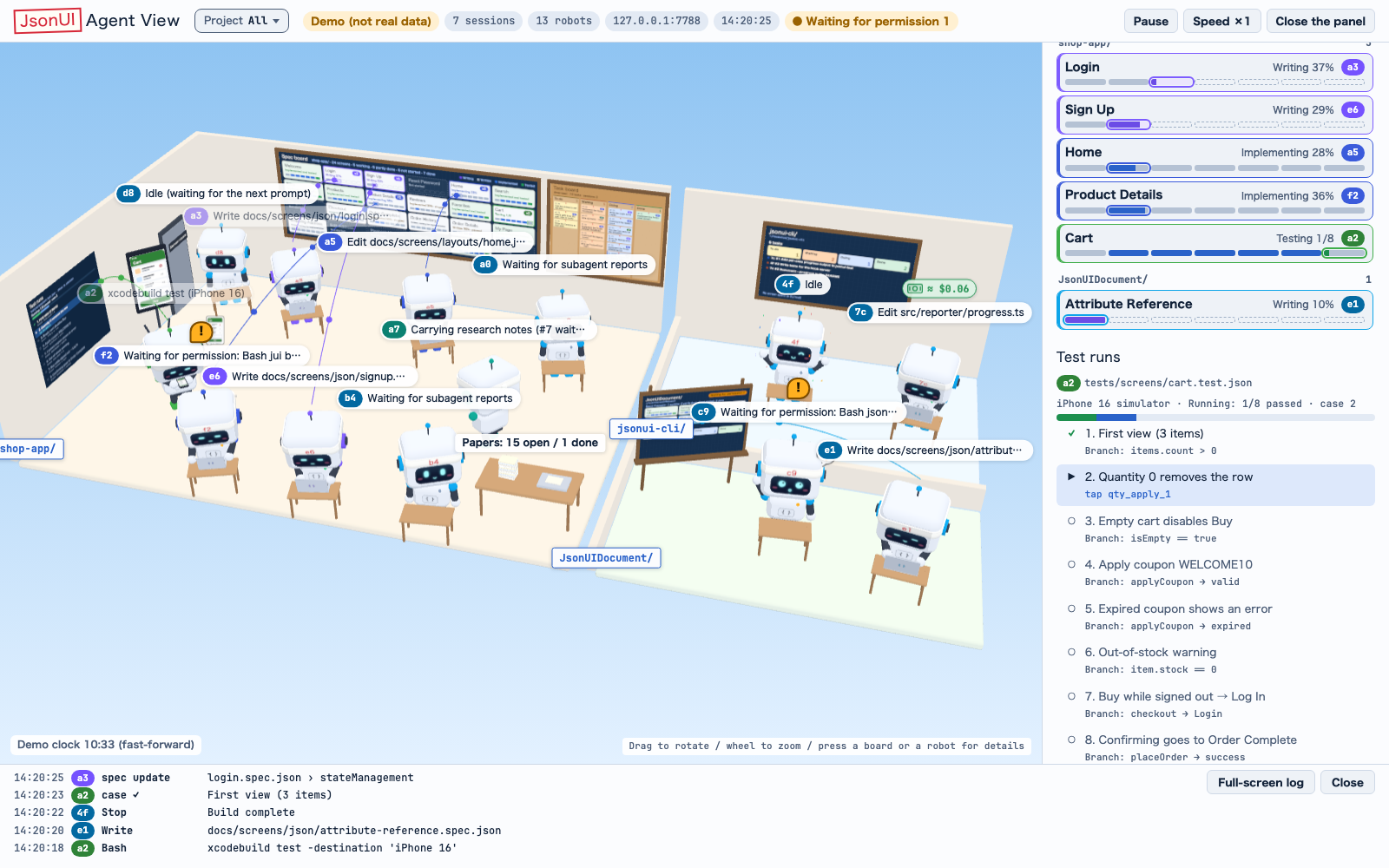 A run in progress, with the demo's sample data.Each run shows its device (the device's name, or iOS, Android or Web), its test file or command, and its status: Running (実行中) with how many cases have passed so far, then Passed (通過) or Failed (失敗). A bar shows how many of the cases have passed.A robot's card lists only the runs that robot started: the one running first, then the latest, at most 3.
1
Start the server: `jui viz start` (or `jui viz serve --open`).2
Run your tests with the JsonUI test runner.3
Watch the running case appear on the test board and on the robot's phone.4
For the detail, look at Test runs (テスト実行) in the side panel, or at the robot's card.A run in progress, with the demo's sample data.Each run shows its device (the device's name, or iOS, Android or Web), its test file or command, and its status: Running (実行中) with how many cases have passed so far, then Passed (通過) or Failed (失敗). A bar shows how many of the cases have passed.A robot's card lists only the runs that robot started: the one running first, then the latest, at most 3.Read pass and failWhen a run finishes, its head says Passed (通過) or Failed (失敗). Hover over the status to see what decided it.
What decides it, strongest firstThe head is decided by the strongest thing that says it:
• jsonui-test-runner's own records (run_end's passed and failed)
• then xcodebuild's last `** TEST SUCCEEDED / FAILED **` on a line of its own
• then a known runner's summary line (from the line's start, in its own form)
• then the exit code
When the runner's records say failed=0, the run shows Passed (通過) even if the command exits 1 for another reason.
Results that survive a restartPass and fail also come from the results the drivers save. So they survive a restart of the viz server, and include runs from before it started.This needs the drivers run without resultsPath.
Where the results areThe drivers write one file per run under ~/.local/state/jsonui-test/results. JSONUI_TEST_RESULTS_DIR changes the folder; it must then be the same for the driver and for the server. `jui viz doctor` prints the folder the server reads.
iOSFrom the simulator only. A run on a real iOS device is not saved there.
AndroidThe device keeps its results, and the server copies them with adb when it starts and when a run ends on that device. Without adb, Android results are not read.
How long results are keptThe latest result of every test file always stays. 14 days and 500 files per app apply only to older results a newer one of the same test file replaced.
Which tests are a spec'sjui viz reads the test folder jui.config.json declares as test.testDir (default tests, relative to that file), and every sub-folder below it.A project whose tests live elsewhere, outside the app's folder for example, declares it:
jui.config.json (test)
"testDir": "../tests/user"The results may be oldA spec's row says the results may be old (結果は古い可能性) when the spec or its layout changed after its newest result.
A result is tied to its test file however the driver spells the file (a name alone, or a longer path), and only commands that run tests show as test runs.
A large test run does not stall the server (a spec's counts follow within half a second), and an app's tests folder inside another tests folder of the same room (tests/<app>/ under the root's tests/) still reaches the app's specs.
When a spec counts as doneA spec's tests are done only when, with a test file of its own and no failed case, the number of passed cases reaches the larger of two counts: its test cases, and the branches its spec lists. The spec board's Done (完了) also needs the implementation done.
For example, a spec with 3 test cases and 8 branches reads tests 3/8 and stays Partly done (途中) until 8 cases pass. The Branches section, the spec's status line (Testing 3/8, Implemented · tests 3/8) and the lists all count against the same number.
Which checkout a result counts forA run jui viz watched is counted for the checkout its session works in: the room's own specs, or, when the session works in a git worktree the room shows, that worktree's app@branch rows (see the spec board in Panels, cards and boards).
A result from a run the server did not watch, such as one read back from the drivers' saved results after a restart, counts for the room's own checkout, never for a worktree's. A case is counted once, although the worktree holds the same test files.
When the session's own folder is in no linked worktree and its tools named exactly one linked worktree in the last 30 minutes, a run it starts counts for that worktree, and the room's own rows do not take it. With two or more named, the run counts for the session's own folder, not a guess.
Updating the drivers
Result file namesThe drivers name each result file <UTC>-<run>-<fileKey8>.json, with the test file's key at the end. jui viz reads these and the earlier names.
Keep reading
jui viz`jui viz` shows the Claude Code sessions and subagents running on your machine (and the Codex sessions too) as rooms and robots in the browser. Start with the demo below, then pick the article for what you want to do./viz
Permissions and questionsAnswering Claude Code's permission requests and questions from the browser instead of the terminal./viz/approvals
Server roomThe room's server room, which shows the infrastructure your project declares in 3D, or flat in 2D./viz/server-room