
← jui vizWriting the infra modelWhat to put in docs/infra so the server room can draw it: the files, the fields, what must never be written, the commands that check the model and draft it, and the flows the room can play.11 min read
The modelThe server room draws only what you write: one or more JSON files directly under docs/infra, merged into one model. Start small, check it with `jsonui-doc validate infra`, then open the door.A minimal fictional model: one environment, an account with a region and a private subnet, four nodes, three edges and one flow. It passes `jsonui-doc validate infra` with 0 errors.
Which files are readOnly the *.json directly under docs/infra are read and merged into one: 50 files, 4 MB each, 16 MB in all. Subfolders, hidden files and symlinks are not read.
The shape: infra-model v0Each file follows the infra-model v0 schema: version (0), environments, groups, nodes and edges (and flows, below). Only version is required in a file. An environment needs an id; a group an id and a kind (account, project, subscription, region, zone, network, subnet, cluster, namespace, host or logical); a node an id and a category; an edge from and to.
A node's category is one of 33, such as compute.function, database.relational, storage.object, queue, edge.cdn or external.saas. provider is a lower-case name such as aws or gcp.
The categories include gateway.nat (a NAT gateway) and network.ip (a public address).
docs/infra/myapp.json
{ "version": 0, "description": "MyApp: a web API on one cloud", "environments": [ {"id": "prod", "label": "Production", "kind": "production"} ], "groups": [ {"id": "myapp-aws", "kind": "account", "provider": "aws", "label": "MyApp account"}, {"id": "tokyo", "kind": "region", "region": "ap-northeast-1", "parent": "myapp-aws"}, {"id": "app-net", "kind": "subnet", "parent": "tokyo", "visibility": "private"} ], "nodes": [ {"id": "web", "category": "client", "label": "Browser"}, {"id": "lb", "category": "load_balancer", "service": "elb.alb", "group": "tokyo"}, {"id": "shop-api", "category": "compute.container", "service": "ecs.fargate", "group": "app-net", "count": 2, "spec": [{"key": "cpu", "value": "512"}, {"key": "memory_mb", "value": "1024"}]}, {"id": "items-db", "category": "database.relational", "service": "rds.postgres", "group": "app-net", "engine": "postgres 16", "spec": [{"key": "instance_class", "value": "db.t3.medium"}, {"key": "storage_gb", "value": "50"}]} ], "edges": [ {"from": "web", "to": "lb", "protocol": "https"}, {"from": "lb", "to": "shop-api", "protocol": "http"}, {"from": "shop-api", "to": "items-db", "protocol": "postgres"} ], "flows": [ {"id": "list-items", "label": "Open the item list", "start": "web", "trigger": "user", "steps": [ {"from": "web", "to": "lb", "action": "request", "label": "GET /api/items"}, {"from": "lb", "to": "shop-api", "action": "request"}, {"from": "shop-api", "to": "items-db", "action": "read"}, {"from": "items-db", "to": "shop-api", "action": "response"}, {"from": "shop-api", "to": "lb", "action": "response"}, {"from": "lb", "to": "web", "action": "response"} ]} ]}Where it came from: iac and evidenceA node can carry its IaC addresses (iac) and its evidence in the code: a file and a string that should still be in it. The checks below compare the model with them.
regionA node can also say its region. Without one it takes the nearest enclosing group's; a logical group passes none on.
specA node can carry a spec: a list of {key, value} pairs in display order, such as instance_class db.r6g.large or memory_mb 1024. At most 20; a key is lower case, letters, digits and _, up to 40; a value up to 120 characters. Write what a person reads, never a secret's value. The same key twice is a warning, and the first is shown.
Iconsjui.config.json's infra.icons sets an SVG, PNG or WebP inside the project as the icon for a service, a cloud or a kind.
No secrets
A file with a secret's shape is not used at allA file with any string shaped like an access key, a token, a private key, an ARN, an account id, an IP address, a connection string, a URL with credentials or a password with its value is not used at all; spec values are scanned too. Write names, labels and ids only.
What the message saysThe message names the kind, never the value, and every kind the scan can find has its words. A password with its value reads 秘密の形(パスワード).
Commands that check itThree commands: validate checks a model, seed drafts one from your project, and check tells you when the model has drifted from the files. The details of every flag are in /reference/cli-commands.
shell
jsonui-doc validate infrajsonui-doc validate infraChecks the schema and the secret shapes, reading the files the way jui viz does, and walks each flow on the model (see Flows). Run it after every change, before you open the door.
shell
jsonui-doc seed infrajsonui-doc seed infraDrafts a model into docs/infra/seed/ from Docker Compose, Terraform, Kubernetes, CloudFormation / CDK, wrangler, PaaS settings files, and the code's SDK imports and environment variable names. It never reads or writes values: no state, tfvars or .env. The draft is not shown; move what you keep into docs/infra.
seed keeps your idsWhen docs/infra holds a model that can be read, a drafted node at an IaC address a declared node lists takes that node's id, and no other drafted node takes it.
seed drafts specseed also drafts a Terraform or CloudFormation node's spec from the values the IaC writes literally: instance_class, engine_version as version, allocated_storage as storage_gb, memory_size as memory_mb, runtime, multi_az and so on. It takes a string, a number or true/false of 120 characters or less. A variable, a reference, anything with ${ and a value shaped like a secret are left out, and seed-report.json counts what was read as specValues.
seed names services as the prices doA drafted node's service is the price rows' name: a database takes its engine (rds.mysql, not rds) and a load balancer its type (elb.alb, AWS's default, when none is written; a variable is not guessed). A Terraform aws_nat_gateway or aws_eip (or CloudFormation's NatGateway and EIP) is drafted as a gateway.nat or network.ip node.
What seed and check walkseed and check walk the project the same way. What git ignores is left out (fetched modules in .terraform/, say) and does not count toward the cap, except cdk.out and cdktf.out, the synthesized IaC that cdk init and cdktf init put in .gitignore, which are read for IaC only. A reached cap is said, instead of reading as no IaC.
Measured in a git repository: a Terraform file in an ignored folder is not drafted, and a CloudFormation template in an ignored cdk.out is.
Leave folders out: infra.excludejui.config.json's infra.exclude lists folders inside the project (another product nested in it, say) that seed and the infra-iac / infra-code checks do not walk into. `jsonui-doc validate infra` warns about a listed folder that is not there and refuses one outside the project.
Each of those two lines says what is wrong, and so do environment.outside, environment.none and spec.ha. `jsonui-doc validate infra` says it in Japanese only, whatever LANG is; the server room's board says it in the page's language, English unless JUI_VIZ_LANGUAGE or the language in jui viz's config.json says otherwise.
Measured on the CLI: a missing folder's line names /infra/exclude/0 and says there is no such folder, and ../outside's asks for a relative path inside the project, both in Japanese, the first also under LANG=en_US.UTF-8. With products/other listed, that folder's queue left the draft.
ECS tasks and types the tables do not mapAn ECS task definition that no service names is drafted as a compute.container node (a batch run by RunTask, a schedule or Step Functions), and a declared node naming a part or a type the tables do not map is found instead of reported as no such resource.
jui.config.json
{ "checks": [ {"name": "infra-iac", "type": "builtin:infra-iac", "gate": true}, {"name": "infra-code", "type": "builtin:infra-code"} ]}shell
jsonui-doc check infrajsonui-doc check infraDeclare builtin:infra-iac (against the IaC) and builtin:infra-code (against the code) in jui.config.json's checks, and `jsonui-doc check infra` tells you whether the model has drifted from the files. Drift is a warning by default and fails only with "gate": true, as on infra-iac in the example above.
check compares specbuiltin:infra-iac also compares a node's declared spec with the IaC's value (spec <key> differs from <file>). The values it could not compare (the IaC writes a variable or a reference, or a key the tables do not know) are counted in one note, and a value with a secret's shape is masked in every field of the report.
FlowsA flow says what happens when someone or something sets the system going: a user's request, a device, a schedule or an event, step by step from a start node. The server room plays it as light running along the cables.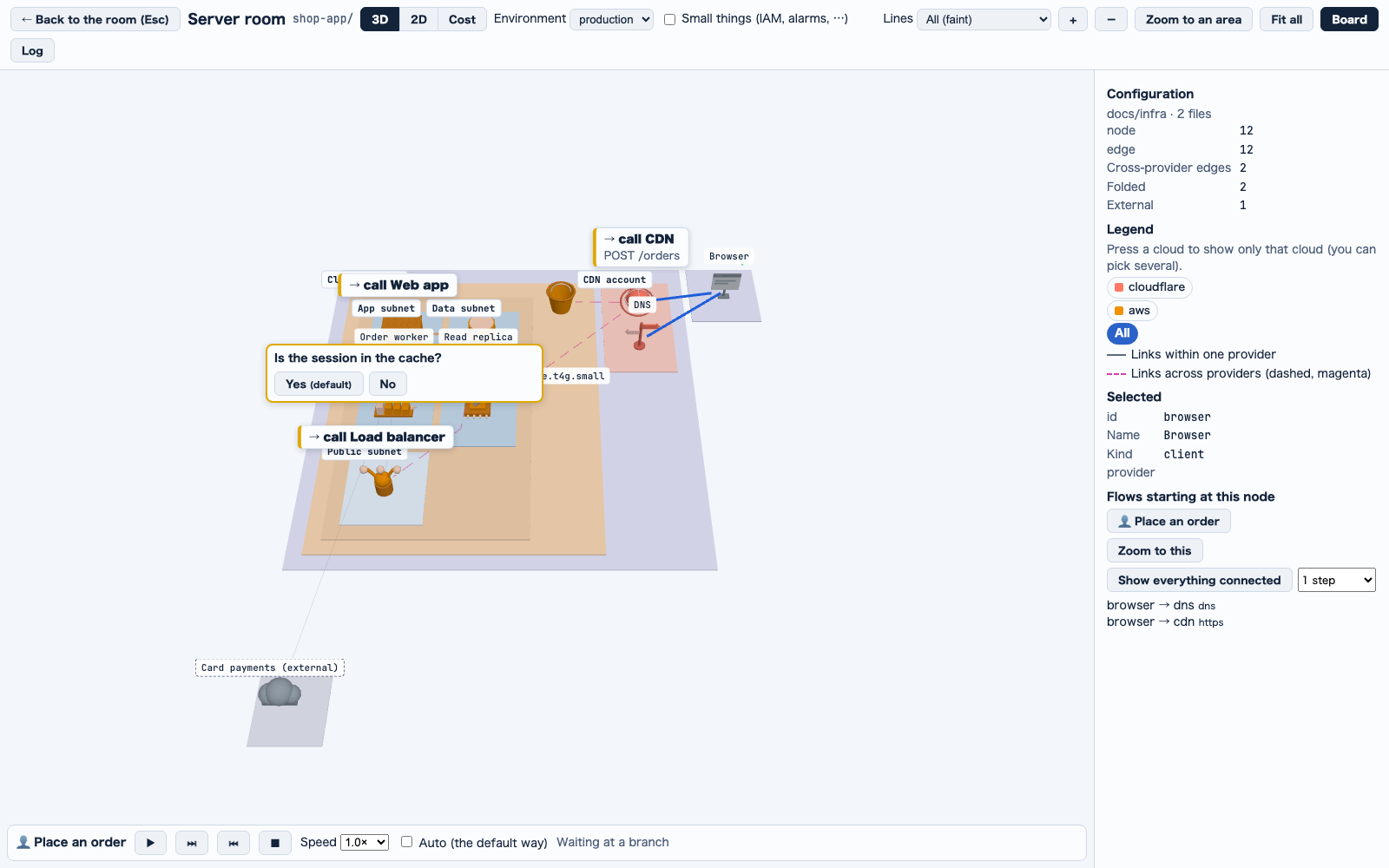
Writing a flowA model file can hold flows, a top-level flows list (200 at most): what a user, a device, a schedule or an event (trigger; user by default) sets going, from a start node, step by step. A step is one of:
• a move along an edge (edge, or from and to; a response goes back along one)
• a node
• a branch: 2 to 6 choices, each going on by its own steps, by goto to another flow or by join to a later step, with an optional default
• parallel lanes (2 to 6)
They nest 4 deep at most. A step can name its action (request, response, read, write, enqueue, publish, auth and so on) and be async. The list-items flow in the example above is a request and its responses, one move per edge.
How validate checks a flow`jsonui-doc validate infra` walks each flow on the model. These are errors, and only that flow is left out: a node or an edge not drawn in the flow's environments, a move that does not leave the node the flow is at, a join backwards, a goto to a missing flow, and defaults that go round a loop of flows. A goto to a flow that starts elsewhere is a warning. builtin:infra-iac and builtin:infra-code stop on any model error, flows included.
One environment at a timeThe way is walked in each environment by itself (flow.env.partial): a flow that names its environments is refused when one of them lacks a step or its start, and a flow that names none is drawn in the environments that hold its whole way, and refused when no one environment does.
Measured: a flow naming prod and stg with a step drawn in prod only exits 1, and the same flow naming prod alone passes.
When a move does not connectThe error for a step that does not leave the node the flow is at (flow.discontinuous) names the three rules a writer most often misses: a round trip is two steps (request, then response), a choice that ends the flow another way goes on by join, and lanes leave from the node the flow is at.
Measured: a call written twice with no response is an error, and the message carries the hint; the same flow with its response step passes.
seed drafts simple flows`jsonui-doc seed infra` drafts one-move flows from EventBridge targets, EventBridge Scheduler, Cloud Scheduler, Lambda event source mappings and S3 notifications.
1
In the server room, find a node with a small green cone: it starts a flow. Press it.2
The board turns to its rows; right under them, Flows starting at this node (このノードから始まる流れ) lists its flows. Press one to play it.3
Watch the light run along each move's edge. The route builds up in a side bar left of the room: a row for the start, each node reached, each way chosen and the end, joined by down arrows, the newest marked as current. Press a row to choose its node.4
At a branch it stops, and its question and ways sit under the side bar's last row: press one. Tick Auto (the default way) (自動(既定の道へ)) to let it take the default by itself; the default's mark then reads (default, taken by itself) ((既定・自動で選ぶ)).5
Use the player: play / pause, one step, one step back (back to a branch: choose again) and stop, a speed and Nodes shown (見せるノード). The speed is 0.5× to 3.0× by 0.25, changed while it plays.Playing flowsThe server room plays flows. Lanes run at once. A rebuild of the 3D (another environment, a cloud filter, the theme) stops it. Problems still show in the board's problems list (問題).
The choices taken are listed one a line, a picked node's flows sit right under its rows with the board turned to them, and the light stays at least 7 px in radius however far you pull back.
The light is no ball: it runs inside the cable itself, a glowing head with a fading tail on the move's clock, and drains into the node it reaches.
The light goes at a pace by distance, 10 world units a second along its cable at 1.0×, so a long cable takes longer. It rests 0.4 s (divided by the speed) at each node it reaches, and twice that at a branch once chosen, with the chosen way lit. Nodes shown (見せるノード) picks which nodes stay while it plays: All (全部), Now (今関係: the move's two ends and the node the light is at), Passed (通った) or Whole flow (流れ全体, the default). A node not shown loses its shape, icon, model, tag, cone and cables, and the floors stay, faint, as a map. The speed and that choice are kept per room. The camera follows a light about to leave the page, but never while the whole room is in view. All of this is the same in 3D and 2D; the migration plan's player is unchanged.
Keep reading
jui viz`jui viz` shows the Claude Code sessions and subagents running on your machine, and the Codex sessions too, as rooms and robots in the browser. Start with the demo below, then pick the article for what you want to do./viz
Server roomThe room's server room, which shows the infrastructure your project declares in 3D, or flat in 2D./viz/server-room
Cost and migrationEstimating what the infrastructure costs a month, and planning a migration./viz/cost